From Data to Decisions: Making the Most of PeopleSoft HCM Insights
-
Posted by Quest Editor
- Last updated 12/08/25
- Share

From Data to Decisions: Making the Most of PeopleSoft HCM Insights
A RECONNECT Session with SpearMC, now part of Mythics
HR, payroll and benefits teams are sitting on a goldmine of data in PeopleSoft—but turning that data into decisions is often the hard part. Teams get stuck exporting into spreadsheets, waiting on IT, or piecing together reports from multiple modules.
In the RECONNECT Spotlight Session “From Data to Decisions: Making the Most of PeopleSoft HCM Insights,” Mythics, together with SpearMC and SmartERP, showed how PeopleSoft HCM Insights dashboards can change that. Presenters Gary Dranikoski and Logesh Balasubramaniam walked through the technology behind OpenSearch dashboards, the delivered HCM content, and the real-world choices customers need to make to get value from PeopleSoft HCM Insights.
Mythics + SpearMC + SmartERP: A full-stack Oracle partner
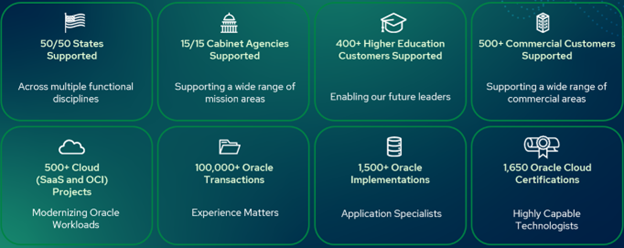
Gary began by introducing the combined organization. Many attendees know SpearMC as a long-time PeopleSoft services and training partner. Others know Mythics as a major Oracle licensing and product reseller. With the acquisitions of SpearMC and SmartERP, Mythics now blends:
- Licensing and product sales for Oracle technologies
- Deep PeopleSoft functional and technical expertise across all pillars
- A strong managed services practice
- A long history with Oracle BI and analytics
- Comprehensive training, including the All Access Learning Pass and the new AI-driven PeopleSoft Learning Assistant
- Cloud and OCI capabilities to modernize on-premises PeopleSoft footprints
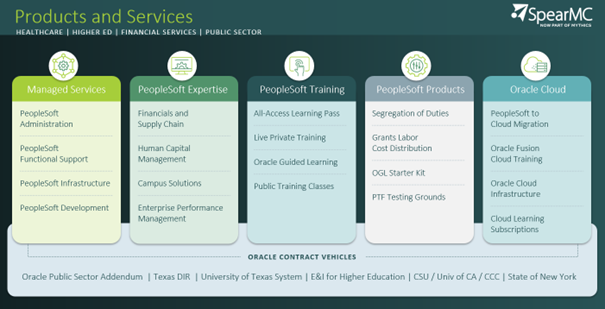
For customers looking to deploy or expand PeopleSoft HCM Insights dashboards, that combination matters. Mythics can advise on architecture, implement and secure the dashboards, host them on OCI, and train end users—all under one roof.
From Kibana to OpenSearch: The analytics engine under PeopleSoft HCM Insights
To explain how PeopleSoft HCM Insights dashboards work, Gary stepped back to the technology.
Earlier PeopleTools releases used Elasticsearch for search and Kibana for visualizations. Starting in 8.60, Oracle introduced OpenSearch and OpenSearch Dashboards. In 8.60 you could still choose; in 8.61 and above, OpenSearch is the standard.
From an end user’s point of view, the experience is consistent. The important changes are behind the scenes. Gary highlighted a key architecture flow you’ll see referenced in Oracle’s PeopleSoft Insights materials:
- Start with PeopleSoft data and a query.
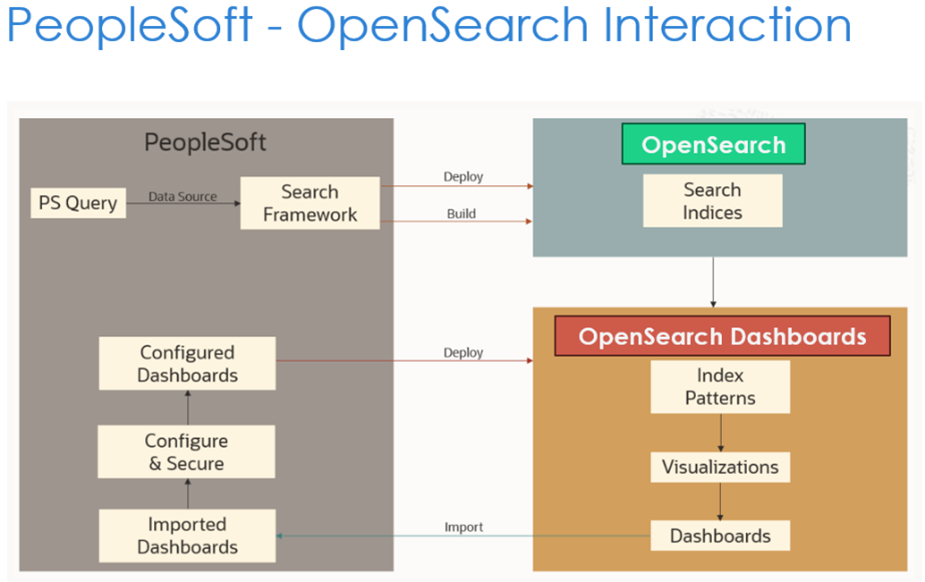 Your employee, payroll or benefits data lives in the PeopleSoft database. You define a PeopleSoft Query to select the fields you need.
 - Build a search definition.
Using Search Framework, you connect that query to a search definition, telling PeopleSoft which fields to expose for search and analytics. - Create a search index in OpenSearch.
Building and running the search definition generates a search index in OpenSearch: a copy of the relevant data structured for fast search and visualization. - Design visualizations and dashboards.
In OpenSearch Dashboards, that index becomes an index pattern. From there, you create bar charts, donut charts, maps and tabular views and group them into a dashboard. - Deploy back into PeopleSoft.
Finally, you import and configure the dashboard in PeopleSoft, secure it, and deploy it as a tile, work center component, or part of the Insights Catalog.
Logesh underscored three points Mythics hears in nearly every HCM conversation: the dashboards don’t query live transactional tables with each click but instead read from indexed data in OpenSearch, which protects system performance; OpenSearch and OpenSearch Dashboards are fully included in PeopleTools with no additional licensing required; and the entire search and analytics stack runs inside the customer’s own environment, ensuring that sensitive HCM data never leaves the organization’s network.
What Oracle delivers vs. what you configure
Gary emphasized how much Oracle has already delivered out of the box. The underlying views, queries, search definitions, indexes, visualizations, dashboards and security roles are all prebuilt, meaning customers focus mainly on deployment rather than development. In most cases, the work involves choosing which dashboards to use, deploying the related search definitions, building the indexes, mapping the delivered security into your own roles and placing the dashboards in the appropriate navigation areas. For organizations with custom security models, Mythics and SpearMC help translate Oracle’s delivered roles so the right users see the right insights.
The PeopleSoft HCM Insights Catalog: One front door for analytics
With more than a dozen PeopleSoft HCM Insights dashboards and dozens of visualizations now delivered, navigation matters. That’s where the Insights Catalog comes in.
Logesh described it as a single hub for HCM analytics. From one tile, users can:
- Open the Insights Catalog
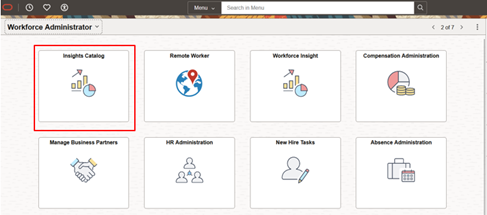
- See a folder tree on the left for modules like HR, Payroll for North America, Global Payroll, Benefits, Performance, Remote Worker, Onboarding and more
- Click any dashboard name and view it instantly on the right-hand pane
The Catalog is configurable and security-aware. Admins can control how folders and dashboards are ordered, and users will only see the dashboards that match their roles.
For Mythics customers, the Insights Catalog has become a recommended starting point: it surfaces the breadth of delivered PeopleSoft HCM Insights dashboards and helps HR leaders quickly see where they want to focus.
Implementation choices: how much data and for how long?
From there, the session turned practical, focusing on one of the biggest levers in any Insights deployment: data volume. When you build an index, you choose how much history to include—indexing everything makes sense for newer PeopleSoft customers, but those with decades of data often need a more selective approach.
Mythics helps organizations tune this per dashboard: workforce composition may benefit from many years of history, payroll cost trends usually need only two to five years, and high-volume areas like Time & Labor often perform best with even shorter windows. The delivered PeopleSoft HCM Insights queries have no built-in date limits, so customers control what goes into the index and can still use dashboard-level time filters like “last 12 months” or “last 2 years” on top of that.
A guided tour of key PeopleSoft HCM Insights dashboards
In the live demo, Logesh launched the Insights Catalog in an HCM 9.2 image and walked through several of the most impactful dashboards.
HR Insights: workforce composition and equity
The HR dashboard gives a broad view of your workforce: headcount by department, location, job family, employment type, age band, ethnicity and more. At the top, users see:
- A time range selector (for example, five years vs. two years)
- A search bar for keyword filters (such as “Sales”)
- A filters panel where almost any field from the index can be turned into a filter
Each tile on the page is a visualization: a donut chart for employees by department, a bar chart for workforce by age band, a map view of headcount by location, or a tabular “raw data” view. Users can click a slice or bar to filter the entire dashboard, open a visualization in focus mode, and use Inspect → Download CSV to pull the underlying data into a spreadsheet for deeper analysis.
These PeopleSoft HCM Insights dashboards are intentionally interactive so HR teams can start with a broad question (“How is our workforce distributed?”) and drill down into specific segments with a few clicks.
Payroll for North America: cost and trend visibility
Next, Logesh opened Payroll for North America in the Insights Catalog. Oracle delivers several PeopleSoft HCM Insights dashboards here, including Payroll Cost Insights and Payroll Trend Insights, with separate content for U.S. and Canada.
Payroll Cost Insights is designed for payroll and finance staff who need to see:
- Overall payroll costs across a chosen period
- Breakdowns by earnings, deductions and taxes
- How those costs vary by business unit, department or other key dimensions
These dashboards are more operational than strategic. They help teams validate recent cycles, identify unusual spikes, and respond quickly to questions from finance or leadership—without building one-off queries.
Benefits: what your people are really using
In the Benefits area, the session highlighted two different types of PeopleSoft HCM Insights dashboards:
- Benefits Administration Processing Insights – operational dashboards showing where life events and open enrollment activity sit in the automated processes
- Benefits Utilization – a strategic dashboard for HR and benefits leaders
Benefits Utilization includes a powerful multi-ring donut chart where the inner ring shows plan types (medical, dental, vision) and the outer ring shows individual plans within those types. Additional visualizations show enrollments vs. waivers, dependent coverage patterns and plan popularity.
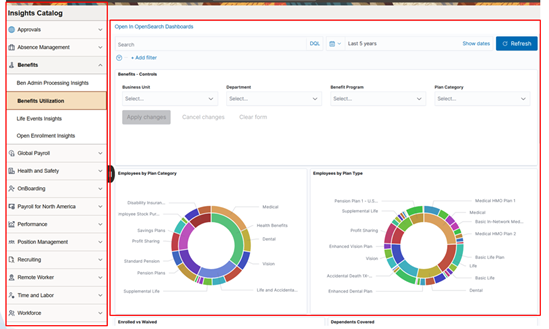
Mythics clients use this PeopleSoft HCM Insights dashboard to answer questions like: Which plans are most heavily used? Which options see low adoption? Do our dependent coverage patterns match expectations? It’s data you can bring straight into renewal discussions and benefits strategy.
Performance Management: admin and manager views
Performance is one of the few areas where PeopleSoft HCM Insights dashboards are delivered for both administrators and managers.
On the administrative side, Document Insights helps HR track where evaluation documents sit in the cycle—how many have started, how many are in progress, how many are complete—and drill down by department or business unit to focus communication.
On the manager side, Team Performance Insights and related “team” dashboards use reports-to security so supervisors see only their own teams’ data. This gives managers a PeopleSoft-native, security-respecting view into their team’s performance distribution and status without exposing organization-wide data.
Security and customization: making PeopleSoft HCM Insights your own
In the final segment, Gary and Logesh tackled security and customization—two areas where Mythics and SpearMC spend a lot of time with customers.
Security is layered:
- Query security controls what data a user ID can access in the first place.
- Row-level security (such as department trees) applies to many administrative dashboards.
- Hierarchy-based security underpins manager views, using position or supervisor relationships.
If a user doesn’t have access at the query level, the PeopleSoft HCM Insights dashboard won’t surface that data, even if they can open the page.
Customization is possible and often targeted. Many organizations run the delivered PeopleSoft HCM Insights dashboards as-is. Others extend them by:
- Adding custom fields to underlying views and queries
- Adjusting queries to limit sensitive data or high-volume history
- Incorporating custom structures into new or cloned dashboards
Because the pipeline—from views to queries to search definitions to dashboards—is configuration-driven, Mythics can help customers extend PeopleSoft HCM Insights while keeping upgrades manageable.
Turning delivered PeopleSoft HCM Insights into real decisions
The session closed with a clear message: Oracle has invested heavily in delivering rich, ready-to-use PeopleSoft HCM Insights dashboards. The opportunity now is to turn those delivered assets into everyday decision tools for HR, payroll, benefits and managers.
With Mythics, SpearMC and SmartERP, customers get a partner who understands the full path:
- Designing an Insights roadmap
- Deploying and tuning indexes and dashboards
- Aligning with security and governance
- Extending dashboards to reflect your unique data model
- Training your teams to use insights in daily work
If you’re ready to move from static reports to interactive PeopleSoft HCM Insights dashboards that support real-time decisions, Mythics is ready to help you get there.

