
December 8 - December 10, 2026
Virtual
Register now to save! Early bird registration ends November 6, 2026!
You’ve got the knowledge. You’ve got the experience.
Thank you for presenting at Oracle Cloud Summit – Virtual!
We’re looking forward to a great event and appreciate your contributions.
Questions about your presentation?
Contact Manisha – manisha.chukpue-padmore@questoraclecommunity.org.
Key Speaker Dates
- July 16, 2026: Call for Presentations Opens
- September 14, 2026: Call for Presentations Closes
- October 19, 2026: Session Acceptance/Invitation to Present Notifications
- October 23, 2026: Speaker Orientation
- October 30, 2026: Deadline to Accept Session in Speaker Portal
- November 2, 2026: Speaker Registration Instructions Sent; Initial Session Schedule Published on Quest Website
- November 6, 2026: Early Bird Registration Deadline (All co-speakers are encouraged to register before this date. Note: Co-presenters do not need to wait for speaker registration instructions and can register at any time.)
- November 13, 2026: Deadline to Register for the Event
- November 16, 2026: Event Platform (Virtual PRO) Open to Speakers and Attendees
- December 4, 2026: Finalized Slide Decks Uploaded into Speaker Portal
- December 8-10, 2026: Oracle Cloud Summit Virtual event takes place
Speaker How-tos
Get Ready to Share Your Expertise
We’re excited to have you share your experience and expertise with the Oracle Cloud community! Use the resources below to manage your session details, prepare your presentation, and make sure everything is ready for Oracle Cloud Summit Virtual.
Accept your session
To confirm acceptance of an invitation to speak at Oracle Cloud Summit Virtual, speakers must officially accept the session online in their Quest account.
To start the acceptance process, please follow these instructions:
- Log into your Quest Account.
- Navigate to My Presentations.
- From the list presented, individually accept the invitation for each session that was selected for the conference.
- View this video tutorial for more details.
Modify your presentation details
You may add speaker details or update your session title or abstract up until December 1, 2026. Edits made after this date may not be updated on session promotions on site and speakers added after this date may not be eligible for complimentary passes. To modify your session details, please follow these instructions:
- Log into your Quest Account
- Navigate to My Presentations.
- From the list presented, select the session that you wish to modify
- You may then edit the details directly.
Upload your presentation deck
Speakers are required to upload a copy of their presentation slide deck by December 4, 2026. To upload your deck, please follow these instructions:
- Log into your Quest Account.
- Navigate to My Presentations.
- Select the presentation for which you wish to upload the deck and click “Next.”
- At the bottom of the next page, click “Add files.”
- Select “Upload files” from the dialogue box on screen, choose the correct document from your files and select “Add.”
- Select “Done” and verify that your deck appears in the File List.
- To upload a deck for another presentation, select “Return to My Account.”
- The upload will automatically save when you exit the page.
- View this video tutorial for more details.
Register for the conference
Accepted speakers will receive email notification when it is time to register for the conference. The appropriate speaker discount will automatically be applied to primary speaker registrations in the online system. No code is required. After receiving the email notice, speakers may register here.
Build Excitement
Share details with your network!
We’ve created a variety of ready-to-use resources to make promoting your participation easy. From LinkedIn banners and personalized session graphics to sample social copy you can use as-is or customize, you’ll find everything you need to spread the word in one place.
- Sample Social Post: Option 1
Exciting news! I’m thrilled to announce that I’ll be presenting at Oracle Cloud Summit Virtual – three days to gain practical learning with real value that make a big impact! Don’t miss out on 3 days with 3 areas of focus: Finance, Procurement, and Human Resources. It’s all happening from December 8-10. Register now and save big with a Corporate Pass! Join us here: https://bit.ly/4hp35HS
#OCSV26 #OracleCloud #QuestCommunity - Sample Social Post: Option 2
Mark your calendars! I’m honored to be a presenter at Oracle Cloud Summit Virtual, the premier virtual gathering for all things Oracle Cloud. With over 3 days covering 3 areas of focus, you won’t want to miss this. It’s happening from December 8-10. Secure your spot and enjoy significant savings by registering with a Corporate Pass: https://bit.ly/3VqpYSI
#OCSV26 #OracleCloud #QuestCommunity - Sample Social Post: Option 3
Thrilled to share that I’ll be taking the virtual stage at Oracle Cloud Summit Virtual, the top destination for Oracle Cloud enthusiasts. Get ready for 3 days of sessions filled with 3 areas of focus, all happening from December 8-10. Don’t wait – register now with a Corporate Pass for fantastic savings: https://bit.ly/4yrgXrh
#OCSV26 #OracleCloud #QuestCommunity
Join your Oracle Cloud Summit Virtual session
- Approximately 15 minutes prior to your presentation:
- You will be sent an email from Manisha Chukpue-Padmore the day before your session with your unique join link – do not share this link! If your session is Monday, you will receive an email the Friday before your session. Find that email and click the link. This will launch the Zoom application and enter you into the waiting room, where only the Quest moderator and presenters are allowed. All co-presenters must be added to the session ahead of time by Quest, to ensure they are admitted into the waiting room early.
- Use this pre-presentation time to verify your sound levels and to confirm you can share your screen. Mac users, please note: you may need to adjust your security settings via System Preferences > Security & Privacy > Privacy > Screen Recording. Check the option for zoom.us.
- At the session start time, the moderator will admit attendees who will be able to view your screen and hear any conversation live. You may wish to share your title slide or greet your audience and let them know that you will be starting soon. Note: it will take 1-2 minutes for all attendees to join the webinar, so you may wish to begin the presentation when you see the participant count level off.
Speaker FAQs
Q: How will I join my session?
A: You will join your session via a Zoom join link that is sent in 3 reminder emails, one week, 24 hours, and 1 hour before your session begins. Use the included Zoom link. This will lead you into meeting waiting room where a Quest staff member will admit you into your session.
Q: How will session broadcasting begin?
A: Attendees will log in to the Virtual PRO Virtual Conference platform, which integrates with Zoom. Attendees will not be permitted to join the session until the official start time and will join directly from the Virtual PRO Oracle Cloud Summit Virtual event platform.
Q: How early can I join my session?
A: You can join your session up to 15 minutes before it begins to prepare your materials.
Q: When and how can I register for the event?
A: If you are listed as the Primary Speaker on your session, you may register under a complimentary pass on the Oracle Cloud Summit Virtual Registration Page. Please note: The site will automatically recognize you as a primary speaker.
Contact us
Registration
Exhibitors & Sponsors

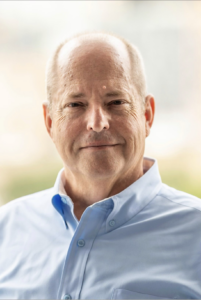
David Lyle
CIO at Carolina Biological
David Lyle is a respected technology executive, business leader, and longtime advocate for professional growth and leadership development. As Chief Information Officer at Carolina Biological, David brings decades of experience leading organizations through strategic \transformation, innovation, and operational excellence.
David has been deeply involved with the Quest Oracle Community, serving on the Quest Board of Directors from 2011 to 2020 and as Board Chair from 2014 to 2016. During his tenure, he helped guide the organization’s strategic direction while fostering collaboration and community engagement across the Oracle ecosystem. In 2017, he founded CommercePros and subsequently served as its Chair through 2019, helping establish a vibrant community focused on Oracle Commerce professionals.
Known among his peers as a trusted advisor, counselor, and mentor, David has dedicated countless hours to helping others navigate their careers and develop as leaders. He is recognized for his thoughtful guidance, strategic perspective, and genuine commitment to supporting the success of those around him. Colleagues frequently describe him as a leader of integrity who builds strong relationships, generously shares his expertise, and consistently invests in developing talent.
David’s leadership style combines sound judgment, humility, and a solutions-oriented mindset. Whether guiding organizations through complex challenges or mentoring emerging leaders, he is known for going above and beyond to help others achieve meaningful results and reach their full potential.
As a Quest Emerging Leaders Mentor, David is passionate about helping the next generation of technology and business leaders build confidence, expand their perspectives, and accelerate their professional growth.
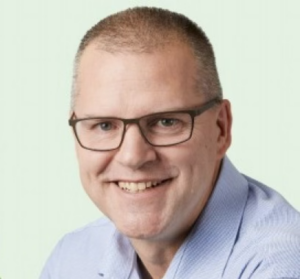
Doug Hayes
Vice President of IT and Procurement
Doug Hayes is a highly experienced technology leader with more than 25 years of success driving enterprise technology strategy, business transformation, and operational excellence across a variety of industries. Currently serving as Vice President of IT and Procurement, Doug has built a career focused on aligning technology investments with business goals, enabling growth, and delivering measurable value through innovative solutions and strong leadership.
Throughout his career, Doug has led large-scale enterprise application initiatives, ERP transformations, cloud technology implementations, and global system integrations. His experience spans leadership roles at Vetsource, Banfield Pet Hospital, ESI, Holiday Retirement, and Columbia Sportswear, where he successfully guided organizations through complex technology changes while fostering collaboration between IT and business teams.
At Vetsource, Doug led teams responsible for enterprise applications, infrastructure, pharmacy automation systems, and technology enablement, supporting rapid organizational growth and driving business efficiencies through strategic technology investments. Earlier in his career, he played key leadership roles in Oracle Cloud, ERP, analytics, supply chain, and customer relationship management implementations, earning a reputation for delivering complex programs on time and with lasting business impact.
Known for his practical leadership style and commitment to partnership, Doug excels at building high-performing teams, developing future leaders, and creating strong relationships across organizations. He is passionate about helping businesses leverage technology as a strategic enabler while cultivating environments where individuals can learn, grow, and contribute at their highest potential.
Doug’s extensive experience leading enterprise technology organizations has given him a unique perspective on change management, organizational alignment, and leadership development. He understands the challenges emerging leaders face and is committed to sharing lessons learned from decades of navigating transformation, building teams, and delivering results.
As a Quest Emerging Leaders Mentor, Doug is dedicated to helping participants strengthen their leadership capabilities, broaden their strategic thinking, and confidently navigate the opportunities and challenges that come with advancing their careers.
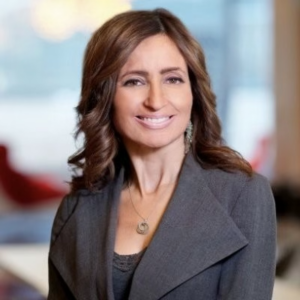
Maria Aiello
Chief Operating Officer, Clarity Building Controls
Maria Aiello is an accomplished technology and business executive with a distinguished career spanning information technology, digital transformation, real estate technology, and organizational leadership. Currently serving as Chief Operating Officer at Clarity Building Controls, Maria is widely recognized for her ability to align technology strategy with business objectives, drive innovation, and deliver transformative outcomes across complex organizations.
Throughout her career, Maria has held senior leadership positions including Global Head of Real Estate & Mortgages Technology at Manulife Investment Management, Vice President and Technology Leader at PwC, and Chief Information Officer roles with multiple organizations. Her experience spans enterprise technology strategy, business transformation, analytics, cybersecurity, and emerging technologies, making her a respected voice in both the technology and real estate industries.
Beyond her executive leadership roles, Maria is deeply committed to developing future leaders and advancing the technology community. She serves as an adjunct professor, teaches business analytics, and has mentored entrepreneurs through the Colliers Techstars PropTech Accelerator. Her extensive board and advisory experience includes leadership positions with the Proptech Council, Institute of Real Estate Management (IREM), HMG Strategy, and numerous technology and industry advisory boards.
A recognized industry leader, Maria has been honored as a GlobeSt Woman of Influence and has earned recognition for her contributions to business process transformation and technology leadership. She is known for fostering collaboration, encouraging innovation, and helping organizations and individuals navigate change in an increasingly digital world.
As a longtime contributor to professional communities and leadership development initiatives, Maria brings a unique perspective that combines executive experience, strategic vision, and a passion for mentoring others. She believes in empowering emerging leaders to think strategically, embrace continuous learning, and build the confidence needed to lead through transformation and growth.
As a Quest Emerging Leaders Mentor, Maria is excited to share her expertise in leadership, technology strategy, and career development while helping participants expand their professional networks, strengthen their leadership capabilities, and achieve their long-term career goals.

Michael Carney
Michael Carney is a seasoned technology executive and transformational leader with more than 25 years of experience helping organizations leverage technology to drive business value, operational excellence, and organizational growth. Throughout his career spanning manufacturing, consulting, and nonprofit sectors, Michael has successfully led enterprise-scale technology initiatives, digital transformation programs, ERP modernizations, and cloud adoption strategies while building high-performing teams that consistently deliver results.
Currently serving as Vice President of Information Technology at Komline, Michael has held senior leadership roles with organizations including Dewberry, AARP, and Honeywell. He is widely recognized for his ability to develop strategic technology roadmaps, lead complex enterprise programs, and translate technical solutions into meaningful business outcomes. His expertise spans enterprise applications, solution architecture, data platforms, agile delivery, and technology-driven organizational transformation.
A passionate advocate for leadership development, Michael believes that successful transformation starts with people. Throughout his career, he has focused on mentoring cross-functional teams, fostering collaboration, building stakeholder relationships, and creating environments where individuals and organizations can thrive. His leadership style combines strong business acumen, technical depth, and a commitment to helping others grow professionally.
Michael has also made significant contributions to the Quest Oracle Community, serving on the Quest Executive Board and as its Past Chairman. In those volunteer leadership roles, he helped guide the organization’s strategic direction, strengthen community engagement, and advance opportunities for Oracle users to learn, connect, and share best practices.
As a Quest Emerging Leaders Mentor, Michael brings a wealth of experience in technology leadership, strategic planning, and organizational transformation. He is committed to helping emerging leaders broaden their perspectives, navigate career challenges, develop leadership confidence, and maximize their impact within their organizations and the technology community.